Table of contents
How to Log In to 555VU
- 01
Open 555VU
Use the app or an official address in your browser.
- 02
Tap Log In
Find the login option on the home screen or in Profile.
- 03
Enter your details
Type your registered mobile number and password carefully.
- 04
You are in
Your PKR balance appears at the top of the home screen.
Auto Login with the Quick APP
The Quick APP option in the download prompt is labelled “Auto login”. After you sign in once, it keeps you logged in so the app opens straight to your lobby. That is convenient, but it also means anyone who picks up your unlocked phone can open your account, so keep a screen lock on your device.
Forgotten Your Password?
- 01
Tap the reset option
It is on the login screen.
- 02
Verify your number
Enter your registered number and the code you receive.
- 03
Choose a new password
Make it strong and new, then sign in.
Support will never ask for your password or verification code.
When 555VU Will Not Open
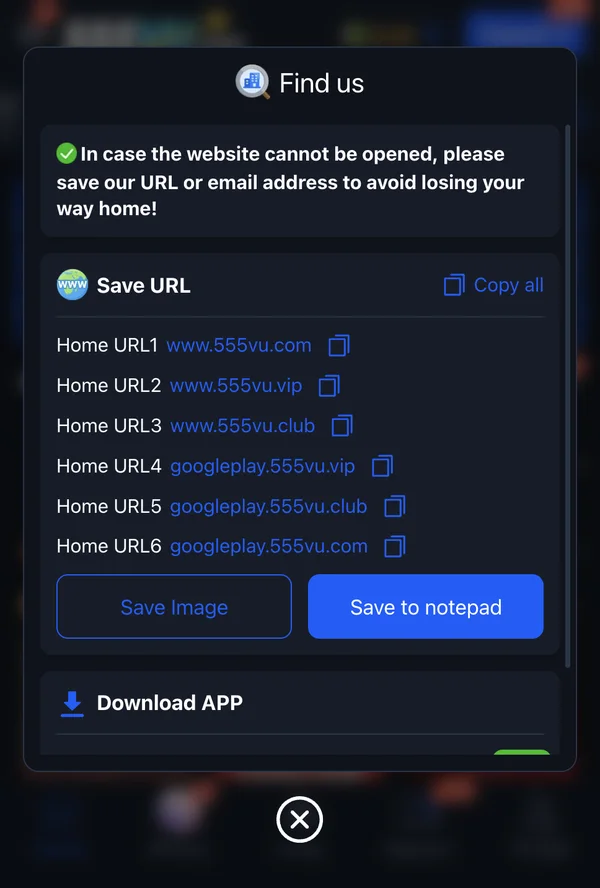
If the address you normally use does not load, do not search for a new one. Use the official list from the app’s “Find us” screen instead: www.555vu.com, www.555vu.vip, www.555vu.club, and the googleplay subdomains of each.
The app itself recommends saving these addresses, and offers “Copy all”, “Save Image” and “Save to notepad” buttons for exactly this reason.
Common Login Problems
Wrong password
Check keyboard language and Caps Lock, or reset it.
No verification code
Check signal and inbox, then request again after a minute.
Account locked
Wait, or contact live support for help.
Page not loading
Switch to another official address.
New phone
Install the app again and sign in with the same details.
Lost SIM
Replace the SIM for the same number, then contact support.
Frequently Asked Questions
Do I have to log in every time?
Not with the Quick APP, which offers auto login.
Can I log in on two phones?
Usually yes, but sign out of phones you no longer use.
Is login different on Android and iPhone?
No. You use the same number and password everywhere.
Who can help if I am locked out?
Official 555VU live support.
Sign in to 555VU
Use the app or an official address, and keep your login details private.
Share this guide
Know someone setting up 555VU? Send them this page.